
The Attack May Start With Something Nobody Thought Was Important
It is Monday morning.
Your team begins work as usual. Emails are arriving. The website is online. Customers are submitting enquiries. Your cloud applications are running.
Nothing appears unusual.
Then someone notices that a customer received a strange email that appears to have come from your company.
A few minutes later, another employee reports that they cannot access an administrative account.
Your website starts behaving strangely.
The technical team begins investigating.
Eventually, the uncomfortable question appears:
“How did someone get in?”
The answer is not always an advanced zero-day vulnerability or a sophisticated attacker breaking through layers of enterprise security.
Sometimes it is much simpler.
An administrator account was still protected by an old password.
A former developer still had server access.
A WordPress plugin had not been updated.
An API endpoint exposed more information than intended.
A backup existed—but nobody had tested whether it could actually be restored.
Or an attack had been happening for hours before anyone noticed.
That is one of the realities of cybersecurity in 2026:
Businesses do not always fail because they have no security. They often fail because small security gaps accumulate until someone finds a way through them.
Here are ten mistakes organisations should pay particular attention to.
01. Giving Administrator Access Too Easily
Administrator access is convenient.
That is exactly why it can become dangerous.
Imagine a website that has been maintained for five years. During that period, the business may have worked with an internal employee, freelance developer, SEO agency, hosting company, website agency and perhaps another developer who fixed an urgent problem.
How many of them still have access?
Surprisingly often, nobody knows.
An organisation might have:
12 administrator accounts when only three people actually require administrative privileges.
The problem is not simply the number of accounts. Every unnecessary privileged account becomes another potential route into the environment.
The same principle applies beyond websites:
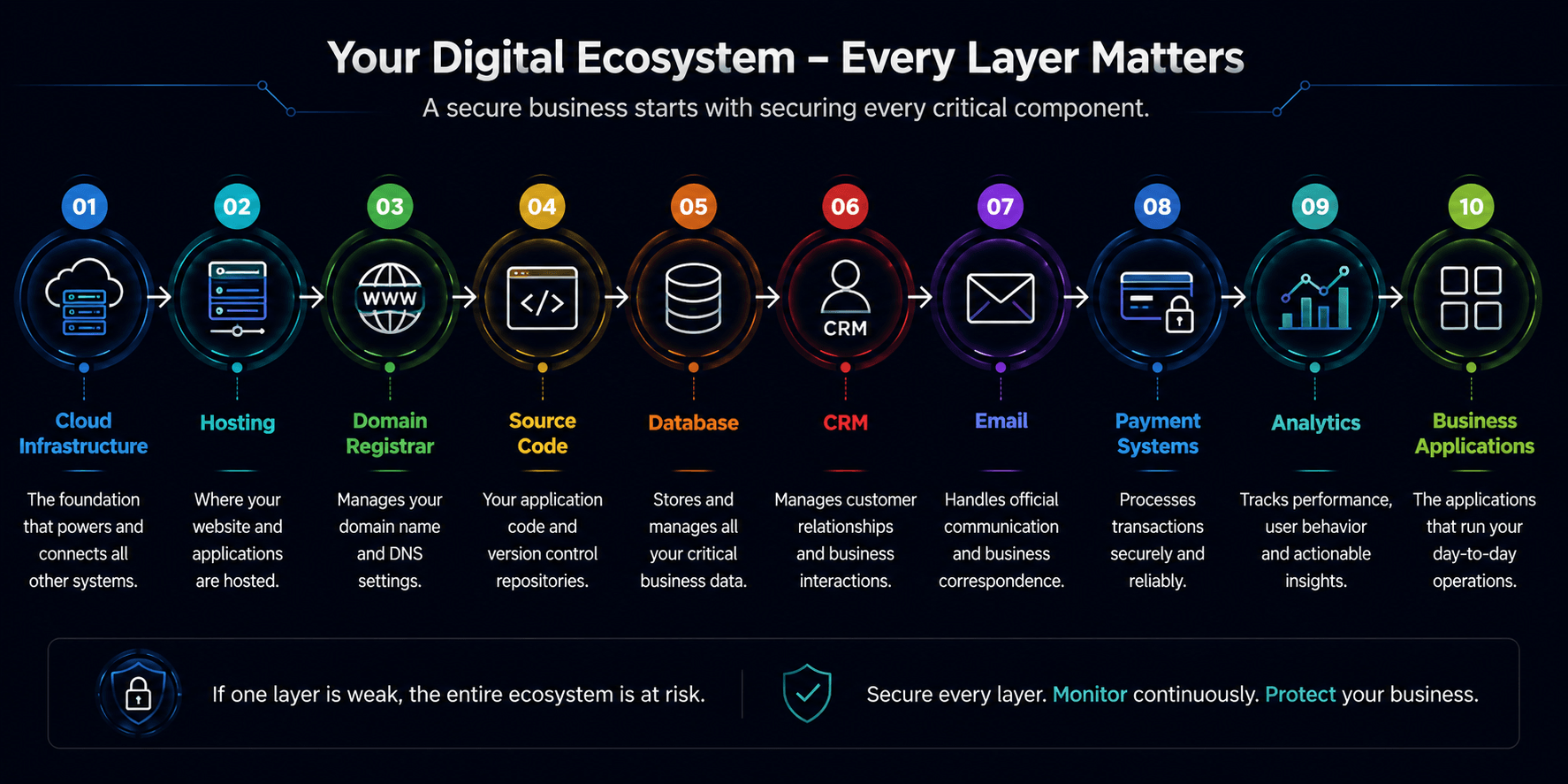
Administrative privileges should therefore be treated as a controlled business asset.
Businesses should periodically ask:
Who currently has administrative access, why do they need it, and when was that access last reviewed?
Use individual accounts wherever possible, follow least-privilege principles, remove unused accounts and revoke access promptly when employees, agencies or contractors leave.
02. Sharing Passwords Through WhatsApp, Email or Spreadsheets
This happens in businesses of almost every size.
Someone asks:
“Can you send the hosting password?”
A colleague replies through WhatsApp.
Another password gets stored in an Excel sheet.
Someone else sends the WordPress credentials by email.
Months later, nobody remembers who received them.
The password itself may still work.
This creates two problems.
First, the organisation loses visibility over who knows the credential.
Second, when several people use the same account, it becomes difficult to determine who performed a particular action.
Instead of one shared administrator account such as:
admin@company
provide individual access where the platform supports it.
A controlled password manager can also be used for credentials that genuinely must be shared.
And when somebody leaves the organisation, access should be removed—not simply forgotten.
Credentials should have ownership, purpose and lifecycle.
03. Running Outdated Websites and Applications Because “They Still Work”
One of the most dangerous sentences in technology is:
“Don’t update it. Everything is working.”
A website can look perfectly normal to customers while running outdated software underneath.
That might include an outdated:
- CMS
- framework
- plugin
- theme
- JavaScript library
- server package
- runtime
- API dependency
The business sees a functioning website.
An attacker may see a known vulnerability.
This becomes particularly dangerous with older applications where developers are afraid to update components because newer versions could break existing functionality.
So updates continue to be postponed.
Six months becomes a year.
A year becomes three years.
Eventually the organisation has a system that is both difficult to modernise and increasingly difficult to secure.
Security maintenance should therefore be treated as an ongoing process:
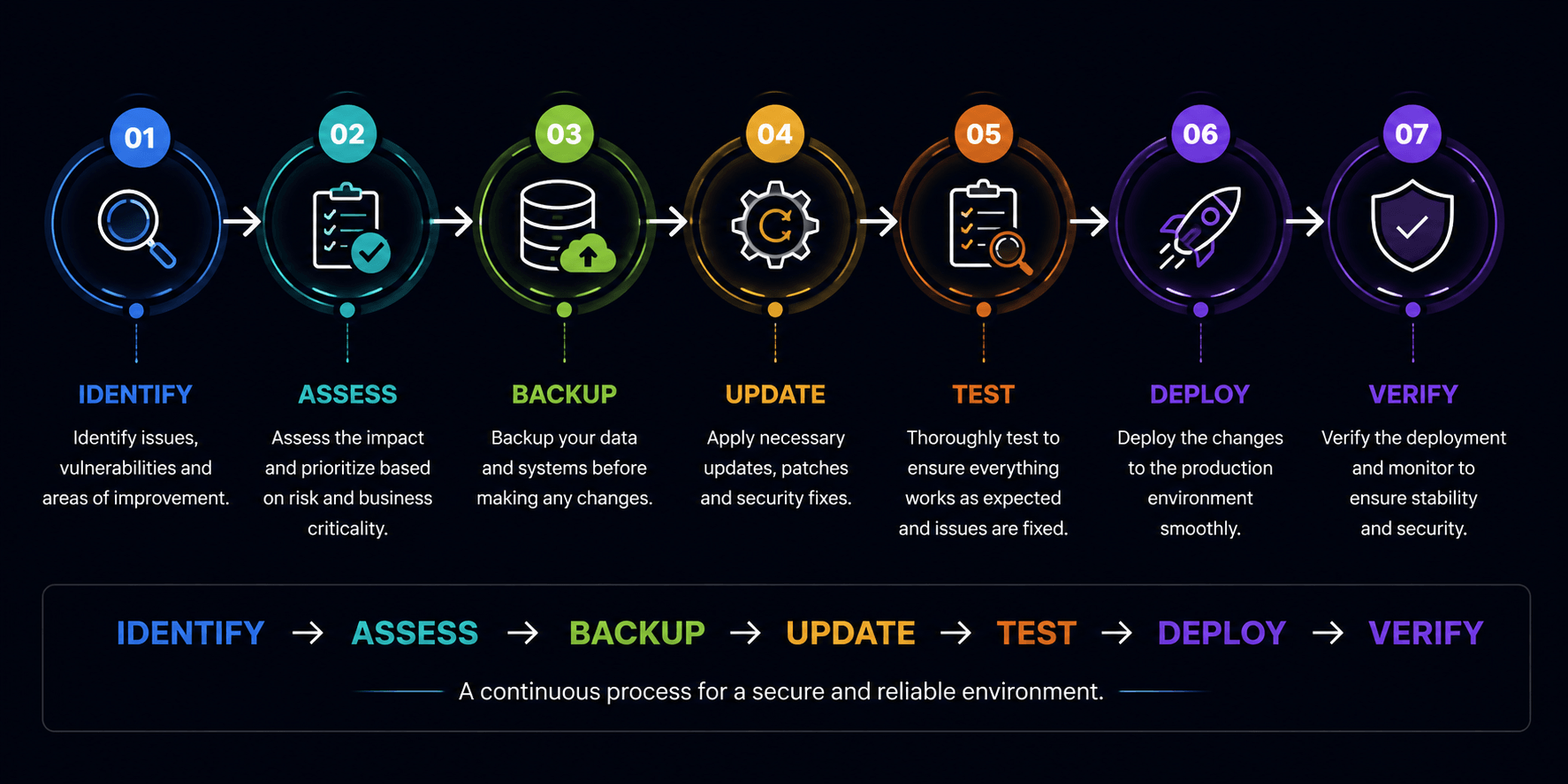
Not every update needs to be pushed immediately into production. But every important security update deserves evaluation.
04. Protecting the Website but Forgetting the APIs
Modern businesses increasingly operate through APIs.
Mobile applications use them.
Web applications use them.
Payment systems use them.
Customer portals use them.
Internal systems communicate through them.
Yet businesses sometimes protect the visible website while paying much less attention to what happens behind it.
Consider a simplified example.
A logged-in customer requests:
/api/orders/10025
The application correctly returns their order.
But what happens if they change 10025 to 10026?
If the server only checks whether the user is logged in—but fails to verify whether that particular order belongs to the user—the application may expose another customer’s information.
The interface might look secure.
The login page might be secure.
The server might use HTTPS.
But the authorisation logic is still vulnerable.
API security therefore needs to consider authentication, authorisation, object-level access, input validation, tokens, rate controls, sensitive data exposure and business logic.
A hidden API endpoint is not a security control.
05. Using Passwords Without Multi-Factor Authentication
Suppose an employee uses a strong password.
Good.
Now suppose that password is stolen through phishing, malware, credential reuse or another compromised service.
What stops the attacker from logging in?
If the answer is nothing, the organisation is relying heavily on a single security control.
This is why multi-factor authentication (MFA) has become so important.
Even if an attacker obtains the password, another verification factor can make account takeover significantly harder.
Businesses should prioritise MFA for high-impact systems such as:
Email, cloud infrastructure, domain registrar accounts, source-code repositories, hosting control panels, administrative applications, financial systems and password managers.
MFA does not make an account invulnerable.
But leaving critical administrative accounts protected only by passwords creates unnecessary risk.
06. Having Backups but Never Testing Recovery
Ask a business:
“Do you have backups?”
The answer is usually:
“Yes.”
Ask another question:
“When did you last restore your website or database from one of those backups?”
The room can become considerably quieter.
A successful backup notification does not automatically mean successful recovery.
Backups can be:
- incomplete
- corrupted
- incorrectly configured
- inaccessible
- too old
- stored in the same compromised environment
- missing important databases or uploaded files
A backup strategy therefore needs to answer more than “Are backups running?”
It should answer:
What is backed up?
How frequently?
Where is it stored?
How long is it retained?
Who can access it?
What happens if the primary environment is unavailable?
Has restoration actually been tested?
The purpose of a backup is not to produce a green “Backup Successful” notification.
Its purpose is recovery.
07. Forgetting About Former Employees, Developers and Vendors
A company hires an agency to redesign its website.
The agency receives hosting access.
A freelancer receives WordPress administrator access.
Another developer receives Git repository access.
An employee receives access to the domain registrar.
A cloud consultant receives infrastructure access.
The project finishes.
Everyone moves on.
But the access remains.
This is how access accumulation happens.
Months or years later, the organisation may no longer have a reliable answer to a very simple question:
Who can access our systems today?
This is particularly important when working with external service providers.
Businesses need an offboarding procedure covering accounts, SSH keys, API credentials, access tokens, VPN access, cloud permissions, administrator accounts and shared passwords.
When someone no longer needs access, remove it.
Do not wait for an incident to perform your first access review.
08. Assuming Cloud Hosting Automatically Means Cloud Security
Moving an application to a major cloud provider does not automatically make the application secure.
Cloud providers can offer sophisticated security capabilities.
But businesses still need to configure their environments correctly.
A perfectly secure front door does not help much if somebody leaves a side door open.
Common areas requiring attention include:
Firewall rules, open ports, administrator privileges, public storage, database exposure, SSH access, secrets, backups, logging and production access.
For example, a development team may temporarily open a database port to troubleshoot a problem.
The issue gets fixed.
Everyone moves to the next task.
The temporary rule remains.
Temporary configurations have a habit of becoming permanent configurations unless someone owns the review process.
Cloud security therefore requires continuous attention to access, configuration, deployment and monitoring.
09. Treating VAPT as a Certificate Instead of a Process
The VAPT report arrives.
It contains:
2 Critical
6 High
11 Medium
18 Low
The PDF is forwarded internally.
A few critical issues are fixed.
Someone replies:
“Completed.”
The report gets stored in a folder.
Six months later, nobody is certain which vulnerabilities were actually fixed, which were accepted, which remain open and whether the fixes were ever independently verified.
This is where vulnerability management becomes important.
A finding should have a lifecycle:
Open → Assigned → In Progress → Fixed → Re-Test → Closed
Each significant vulnerability should have an owner, severity, remediation status and verification outcome.
And remediation matters just as much as detection.
A scanner can tell you that something may be wrong.
The real work is understanding the risk, correcting the underlying weakness and confirming that the correction works without introducing another problem.
Finding vulnerabilities is only the beginning. Closure is the objective.
10. Monitoring Uptime but Not Security Signals
Many organisations monitor whether their website is online.
That is useful.
But consider this situation:
Your website returns HTTP 200 OK.
The monitoring dashboard shows:
🟢 UP
Meanwhile:
An attacker is repeatedly requesting xmlrpc.php.
Another IP is probing /wp-admin.
Thousands of requests are hitting unusual URLs.
A malicious administrator account has appeared.
Server CPU utilisation has suddenly increased.
Unexpected files have been modified.
From a traditional uptime perspective:
Everything is fine.
From a security perspective:
Something may be very wrong.
This is why modern monitoring should go beyond simple availability.
Depending on the environment, businesses should consider visibility into unusual traffic, authentication activity, application errors, resource utilisation, security alerts, file changes, backup failures and other relevant operational signals.
The objective is not to collect thousands of alerts.
The objective is to identify meaningful abnormal behaviour early enough to respond.
The Bigger Problem Isn’t One Mistake
Now return to the business from the beginning of our story.
Perhaps the incident didn’t happen because of one catastrophic failure.
The website was outdated.
An old administrator account still existed.
MFA wasn’t enabled.
The backup had never been tested.
And monitoring only checked whether the website responded.
Individually, each issue may have seemed manageable.
Together, they created an environment where an incident was easier to cause—and harder to detect and recover from.
That is why cybersecurity cannot be reduced to installing a security plugin, buying a firewall or performing one vulnerability scan each year.
It is a combination of:
People + Access + Applications + Infrastructure + Monitoring + Recovery + Process
And all of those components change over time.
A Simple Question Every Business Should Ask
You do not need to begin with:
“Are we 100% secure?”
No responsible security programme can promise that.
Ask something more useful:
“If something goes wrong tomorrow, how quickly would we know, how much access could the attacker obtain, and how confidently could we recover?”
That question immediately changes the conversation.
It forces the organisation to think about prevention, detection, containment and recovery, not simply security products.
A Practical 2026 Cybersecurity Checklist
Start with these questions:
| Area | Question to Ask |
|---|---|
| Administrator Access | Do we know everyone who currently has privileged access? |
| Passwords | Are important credentials individually controlled rather than casually shared? |
| MFA | Is MFA enabled on critical business systems? |
| Website/Application | Are frameworks, CMSs, plugins and dependencies maintained? |
| APIs | Have authentication, authorisation and data exposure risks been assessed? |
| Cloud | Are ports, privileges, storage, databases and production access appropriately restricted? |
| Third Parties | Is access removed when employees, agencies and vendors leave? |
| Vulnerabilities | Are security findings tracked through remediation and re-testing? |
| Backups | Can we actually restore from our backups? |
| Monitoring | Would we recognise abnormal activity before customers report it? |
If several answers are “We’re not sure,” that itself is useful information.
Those are the areas worth investigating first.
Security Is Not a One-Time Project
Businesses change continuously.
New employees join.
Employees leave.
Applications receive new features.
APIs are added.
Cloud infrastructure changes.
Third-party integrations are connected.
Developers deploy new releases.
New vulnerabilities are discovered.
Security controls that were appropriate a year ago may no longer reflect today’s environment.
The goal, therefore, should not be to reach some imaginary point where cybersecurity is “finished.”
The better objective is to build a repeatable process:
Understand → Protect → Monitor → Maintain → Test → Improve
Cybersecurity becomes considerably more manageable when it is treated as part of normal digital operations rather than something considered only after an incident.
Where Hyrrokkin Fits
At Hyrrokkin, we approach security as part of the wider lifecycle of digital platforms—from secure website and application development to website hardening, VAPT and vulnerability remediation, secure cloud deployment, maintenance, monitoring, backup and recovery support.
The objective is not simply to identify technical issues. It is to help businesses understand what matters, prioritise practical risks and move identified issues toward structured technical resolution.
Concerned about the security of an existing website or application?